

I spent an evening trying to convince Visual Studio and my Mac that I no longer work for a defunct company — and that my MAUI iOS provisioning setup has nothing to do with it.
They disagreed.
Every time I paired Visual Studio on Windows to my Mac, two expired Apple signing certificates from an old developer account would magically reappear in the Mac’s Keychain. Delete them? They came back. Delete the provisioning profiles? Came back. Clear the Xamarin provisioning cache? Came back. Remove the Apple account from Visual Studio entirely?
You guessed it.
They. Came. Back.
Eventually I stopped playing certificate whack-a-mole and traced it far enough to watch Visual Studio’s Pair-to-Mac tooling write the old signing identities into /private/tmp as PKCS#12 files and import them into my login keychain.
The culprit turned out to be embarrassingly simple:
%LOCALAPPDATA%\maui\iOS\Provisioning
Not:
%LOCALAPPDATA%\Xamarin\iOS\Provisioning
Welcome to another episode of “the documentation and Stack Overflow answers are technically correct for a version of the tooling I am apparently no longer running.”
Here’s the whole mess, dead ends included.
The setup
Years ago I had an iOS app tied to an Apple Developer account and company I no longer have access to. That project is dead. The company is dead. The developer account might as well be on Mars.
Fast-forward to today and I’m setting up an unrelated .NET MAUI application under my current company and Apple Developer team.
My setup is pretty standard for somebody who insists on doing Apple development without making a Mac their primary computer:
- Visual Studio on Windows
- Mac mini as the build host
- Xcode on the Mac
- Visual Studio Pair to Mac
- Automatic provisioning using an App Store Connect Team API key
I added my current Team Key to Visual Studio and configured automatic provisioning.
Except the provisioning/signing state on the Mac wasn’t behaving like a clean setup.
I opened Keychain Access and found old signing certificates hanging around, including:
Apple Development: Created via API (XXXXXXXXXX)
Apple Distribution: Neon Walrus LLC (XXXXXXXXXX)
Both expired.
Alongside them was the certificate I actually wanted:
Apple Development: Created via API (XXXXXXXXXX)
Fine. Old machine, old development work, old certificates. So I’ll delete them.
Problem solved.
Narrator: the problem was not solved.
The certificates came back
I deleted the old certificates from Keychain.
Then I paired Visual Studio to the Mac.
But they immediately came back.
Well that’s weird.
At first I assumed Xcode was responsible. Maybe it was syncing old developer-account state or restoring certificates from an account I’d previously configured.
So I double-checked to ensure the old Apple account was removed from Xcode and started cleaning.
On the Mac I cleared both the old and new-ish provisioning-profile locations:
rm -rf ~/Library/Developer/Xcode/UserData/Provisioning\ Profiles/*
rm -rf ~/Library/MobileDevice/Provisioning\ Profiles/*
Then I deleted the old certificates from Keychain again.
Pair to Mac.
Boom.
They’re back.
Blame Windows
At that point the timing was suspicious.
The certificates didn’t randomly return while the Mac was sitting there. They returned when Visual Studio paired with it.
So Visual Studio became the obvious suspect.
Historically, Xamarin/Visual Studio stored iOS provisioning data under:
%LOCALAPPDATA%\Xamarin\iOS\Provisioning
So I closed Visual Studio and deleted all the cached .mobileprovision files:
Get-ChildItem "$env:LOCALAPPDATA\Xamarin" `
    -Recurse `
    -Filter *.mobileprovision `
    -ErrorAction SilentlyContinue |
    Remove-Item -Force
Then I got more aggressive and nuked the provisioning directory entirely.
Mac certificates deleted again.
Pair to Mac.
Hello, Neon Walrus LLC. Nice of you to join us again.
FML.
Maybe Windows has the certificates installed?
Windows has its own certificate store, so maybe Visual Studio was pulling the signing identities from there.
Easy enough to check:
Get-ChildItem Cert:\CurrentUser\My |
    Where-Object {
        $_.Subject -match "Apple|Neon Walrus" -or
        $_.FriendlyName -match "Apple|Neon Walrus"
    } |
    Format-List Subject,Issuer,Thumbprint,FriendlyName,NotAfter,HasPrivateKey
Nothing.
Interesting.
The old certificates weren’t in the obvious Xamarin provisioning cache.
They weren’t in my Windows personal certificate store.
They weren’t surviving in the Mac Keychain after I deleted them.
Yet connecting Visual Studio to the Mac somehow reconstructed them.
And not just public certificates. These were signing identities with private keys.
Private keys don’t spontaneously regenerate themselves.
So something still had the goods.
Scorched earth, round two
Next up: the Xamarin/XMA/Pair-to-Mac caches.
Windows:
Remove-Item "$env:LOCALAPPDATA\Xamarin" -Recurse -Force -ErrorAction SilentlyContinue
Remove-Item "$env:TEMP\XMA" -Recurse -Force -ErrorAction SilentlyContinue
Remove-Item "$env:APPDATA\Xamarin" -Recurse -Force -ErrorAction SilentlyContinue
Mac:
rm -rf ~/Library/Caches/Xamarin
rm -rf ~/Library/Logs/Xamarin*
rm -rf ~/Library/Developer/Xamarin
The current Pair-to-Mac logs also revealed that newer MAUI tooling was using:
~/Library/Caches/maui/PairToMac
Fine. Kill that too.
rm -rf ~/Library/Caches/maui/PairToMac
Delete certificates.
Pair.
They’re back.
At this point I was less interested in deleting random directories and more interested in finding out what the hell was putting the certificates into Keychain.
Time to stop guessing.
Catching the bastard in the act
macOS has some excellent tracing tools when you want to know what’s touching something.
I started watching the security subsystem while Pair-to-Mac connected.
That produced this:
security[60596]
...
==== PKCS12 Decode START ====
p12GenMac: SUCCESS
...
commited .../login.keychain-db
Then it happened again under another security process.
And again.
Three separate PKCS#12 imports.
That was interesting because I had exactly three Apple signing identities showing up in Keychain: two old ones and the current one.
Shortly afterward another security process did this:
SecKeychainUnlock
SecKeychainItemCopyAccess
SecACLSetSimpleContents
SecKeychainItemSetAccessWithPassword
There was no longer any ambiguity.
Something in the Pair-to-Mac process was explicitly importing PKCS#12 signing identities into:
~/Library/Keychains/login.keychain-db
The Mac wasn’t “syncing” anything.
Xcode wasn’t resurrecting anything.
Visual Studio’s remote tooling was deliberately installing the certificates.
Where MAUI iOS provisioning stores the P12 files
Now that I knew PKCS#12 files played a role, I used fs_usage to watch the filesystem while pairing:
sudo fs_usage -w -f filesys 2>/dev/null |
grep -Ei 'p12|pfx|pkcs|tmp|temp|cache|keychain'
And there they were:
/private/tmp/AAAAAAAAAAAAAAAAAAAAAAAAAAAAAAAA.p12
/private/tmp/BBBBBBBBBBBBBBBBBBBBBBBBBBBBBBBB.p12
/private/tmp/CCCCCCCCCCCCCCCCCCCCCCCCCCCCCCCC.p12
Even better, one filename matched the serial number of my current Syntax Circus development certificate exactly:
BBBBBBBBBBBBBBBBBBBBBBBBBBBBBBBB
Pair-to-Mac was naming each temporary P12 after its certificate serial number.
We now had the complete Mac-side picture:
something sends signing identity
        ↓
P12 appears in /private/tmp
        ↓
/usr/bin/security imports it
        ↓
login.keychain-db
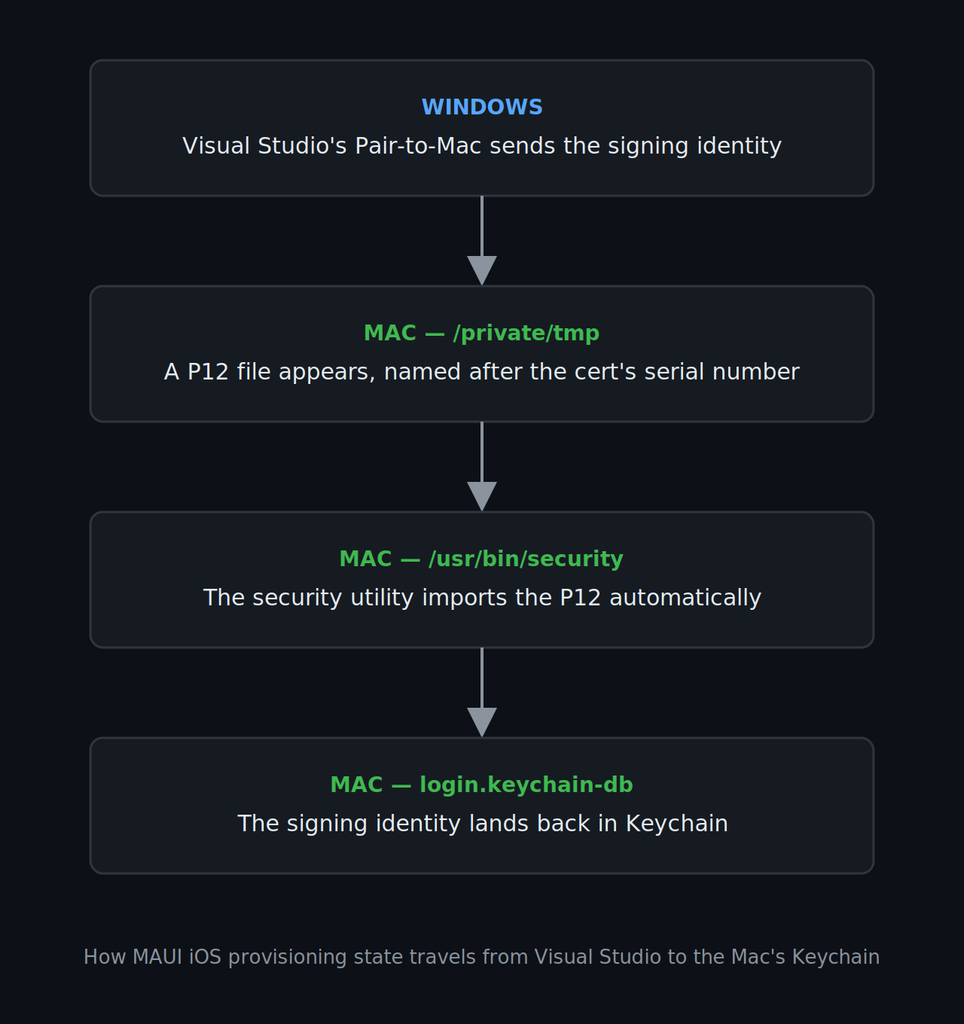
Now all I needed to know was what the “something” was.
So I narrowed fs_usage to those exact filenames.
Bingo:
open ... private/tmp/AAAAAAAAAAAAAAAAAAAAAAAAAAAAAAAA.p12 ... IDB
WrData ... private/tmp/AAAAAAAAAAAAAAAAAAAAAAAAAAAAAAAA.p12 ... IDB
A few milliseconds later:
open ... private/tmp/AAAAAAAAAAAAAAAAAAAAAAAAAAAAAAAA.p12 ... security
There it was.
The Visual Studio/Xamarin IDB Pair-to-Mac agent was writing the P12 onto the Mac. Then /usr/bin/security imported it into Keychain.
MAUI iOS provisioning: ruling out my Visual Studio profile
Before searching the entire Windows filesystem, I wanted to rule out Visual Studio user state.
Visual Studio supports launching with a separate root suffix:
devenv.exe /RootSuffix CleanPairTest
That gives you a fresh Visual Studio user/profile state without destroying your normal setup.
I launched the clean instance.
No Apple account configured.
No project opened.
Nothing.
Deleted the old certificates from the Mac again.
Paired to Mac.
And Neon Walrus LLC came right back.
Son of a bitch.
That ruled out my Visual Studio profile too.
Whatever IDB was feeding to the Mac lived in state shared across Visual Studio instances.
The real MAUI iOS provisioning path
Up until this point, I’d been looking primarily at the historical Xamarin locations:
%LOCALAPPDATA%\Xamarin
But while searching the entire local application-data tree for anything involving MAUI, PairToMac, IDB, XMA, Xamarin, or Apple, something obvious appeared:
C:\Users\<user>\AppData\Local\maui
And underneath it:
C:\Users\<user>\AppData\Local\maui\iOS
And underneath that:
PairToMac
Provisioning
Oh.
Let’s keep going.
%LOCALAPPDATA%\maui\iOS\Provisioning\Certificates
%LOCALAPPDATA%\maui\iOS\Provisioning\CookieStorage
%LOCALAPPDATA%\maui\iOS\Provisioning\DeveloperStorage
%LOCALAPPDATA%\maui\iOS\Provisioning\Profiles
Well, fuck me.
Remember the directory we’d been repeatedly clearing?
%LOCALAPPDATA%\Xamarin\iOS\Provisioning
The current tooling wasn’t using it.
It was using:
%LOCALAPPDATA%\maui\iOS\Provisioning
That directory contained the signing state IDB was faithfully transferring to the Mac every single time Visual Studio paired.
I closed Visual Studio and finally deleted the right thing:
Remove-Item "$env:LOCALAPPDATA\maui\iOS\Provisioning" `
    -Recurse `
    -Force `
    -ErrorAction SilentlyContinue
For good measure I also reset the current Pair-to-Mac state:
Remove-Item "$env:LOCALAPPDATA\maui\iOS\PairToMac" `
    -Recurse `
    -Force `
    -ErrorAction SilentlyContinue
And because I had some positively ancient Xamarin Hot Restart garbage hanging around from the old application:
Remove-Item "$env:TEMP\Xamarin\HotRestart" `
    -Recurse `
    -Force `
    -ErrorAction SilentlyContinue
Back on the Mac, I removed the two old signing identities from Keychain one final time.
Pair to Mac.
Nothing.
No Neon Walrus LLC.
No expired “Created via API” certificate.
And no undead signing identities clawing their way back into Keychain.
Final-fucking-lutely.
The MAUI iOS provisioning fix
If you’re using a current Visual Studio/.NET MAUI setup and Pair-to-Mac keeps restoring stale Apple certificates or provisioning state, close Visual Studio first and look here:
%LOCALAPPDATA%\maui\iOS\Provisioning
Not just here:
%LOCALAPPDATA%\Xamarin\iOS\Provisioning
If your goal is a complete reset:
Remove-Item "$env:LOCALAPPDATA\maui\iOS\Provisioning" `
    -Recurse `
    -Force `
    -ErrorAction SilentlyContinue

Remove-Item "$env:LOCALAPPDATA\maui\iOS\PairToMac" `
    -Recurse `
    -Force `
    -ErrorAction SilentlyContinue
Then remove the unwanted signing identities from the Mac Keychain.
You can also clear the Mac’s Pair-to-Mac cache:
rm -rf ~/Library/Caches/maui/PairToMac
Reconnect Visual Studio and let it rebuild the current state.
Obviously, don’t blindly delete signing material you still need. I wanted a clean break from a dead developer account and a fresh start under a different Apple Developer team.
How to prove Visual Studio is doing MAUI iOS provisioning
If you’re seeing the same bizarre behavior and want to confirm it before deleting anything, fs_usage on the Mac makes this surprisingly easy.
Delete the unwanted certificate from Keychain first, then run:
sudo fs_usage -w -f filesys 2>/dev/null |
grep -E '/private/tmp/.*\.p12'
Now Pair to Mac.
If you’re hitting the same behavior I was, you should see IDB write something like:
/private/tmp/<certificate-serial-number>.p12
followed almost immediately by the security process opening it.
That’s Visual Studio’s Pair-to-Mac tooling shipping the signing identity to the Mac and importing it.
At least then you know you’re not losing your mind.
The actual lesson
There were two problems here.
The first was stale Apple signing material.
The second — and much more annoying — was stale knowledge about where current tooling stores that material.
Almost every reasonable breadcrumb points toward Xamarin:
%LOCALAPPDATA%\Xamarin
And that makes sense. Microsoft’s iOS tooling grew out of Xamarin. Even current Visual Studio logs still contain namespaces like:
Xamarin.Messaging
Xamarin.VisualStudio.IOS
It just wasn’t where the important state lived anymore.
The modern tooling had moved it under:
%LOCALAPPDATA%\maui
Meanwhile, Pair-to-Mac was doing exactly what Microsoft built it to do. It had three Windows-side signing identities available, so every time it connected to the Mac, IDB synchronized them.
That’s the part worth remembering.
When something you delete keeps coming back, stop deleting the destination.
Find the thing that’s recreating it.
It wouldn’t be the first time dev tooling pointed me somewhere subtly wrong — see host.docker.internal Is a Liar (On Linux) for the same lesson in a different disguise.
Practical takeaways
- Current .NET MAUI iOS provisioning state may live under
%LOCALAPPDATA%\maui\iOS\Provisioning, not the older%LOCALAPPDATA%\Xamarin\iOS\Provisioning. - Visual Studio’s Pair-to-Mac tooling can synchronize full Apple signing identities to the Mac, including the private key.
- Deleting a certificate from macOS Keychain accomplishes nothing if Visual Studio still has the identity cached on Windows. It’ll happily put it right back.
- A fresh Visual Studio
/RootSuffixprofile does not isolate you from the MAUI iOS provisioning store Visual Studio shares across instances. - On current tooling,
~/Library/Caches/maui/PairToMacis worth knowing about on the Mac side. fs_usageis fantastic when you need to stop guessing about what process is touching a file.- Pair-to-Mac stages signing identities as P12 files under
/private/tmp/<certificate-serial>.p12; at least in the version I traced. - The
IDBagent writes those files and macOS’ssecurityutility imports them into the login keychain. - If deleting something makes it immediately reappear, don’t keep deleting it harder. Figure out who’s putting it back.
- And perhaps most importantly: when troubleshooting modern .NET MAUI, remember that a decade of Xamarin answers on the Internet may be almost correct. “Almost” can apparently cost you an entire fucking evening.
At least now the ghosts are gone.

1 comment on “MAUI iOS Provisioning: Why Old Certs Return”