

If, like me, you’ve assumed that server-rendered HTML takes care of Blazor Server SEO, there are a few other things worth checking. I had titles, descriptions, canonical tags, and a sitemap in place. When I finally looked at the site from a potential customer’s perspective, however, I found several things I’d overlooked.
The app is Sin Forgiver, a parody app that lets you buy certificates of forgiveness for petty offenses. I’m a non-confrontational person, and I built it as a way to share frustrations with others in a fun way. You pick an offense, pay 99 cents, and get a numbered certificate you can send to someone or frame and keep for yourself.
For context, the website is a .NET 10 Blazor Web App with static public pages and interactive server-rendered pages where needed. There’s also a MAUI app and a set of backend services. I’ll walk through what I found, what I changed, and which audit findings I decided to leave alone.
How I found out
I’d seen a post from Thomas Burkhart on X where he described having Claude spawn a critic agent, run it on Opus, and prime it to play his target audience. He was unhappy with the copy Claude had written for his SEO blog pages and ad landing pages, and said the critic worked surprisingly well. Here’s the post.
His focus was copy, but I wanted to see what the same approach would reveal about finding and using my site. So I tried it the same day.
I asked Claude to create an Opus critic agent representing someone in my audience. This person would primarily use a phone, be between 18 and 40, share jokes in group chats, and buy gag gifts. They would also be skeptical of a site asking for money. The agent’s job was to search the way that person might, open the live site, and explain what didn’t work for them.
If you try this yourself, give the critic a specific audience and task. I wanted observations about the experience, rather than another list of generic SEO recommendations.
What the searches and site visit revealed
During the November 23, 2026 audit, it tried about fifteen searches covering curiosity, gifts, sharing, and whether the app was legitimate. It reported that my site didn’t appear in those results, including its brand-name search. Other results included religious confession apps and old stories about a Catholic confession app.
That doesn’t establish whether Google had indexed the site. Search results alone don’t answer that question; I’d need to check the relevant URLs in Search Console. It did show that the searches used in this audit weren’t finding what I expected.
Once on the site, the critic also pointed out a more immediate problem:
“I’m paying for a picture and nobody shows me the picture.”
The certificates shown on the site were text mock-ups stamped “Issued, pending.” Visitors couldn’t see what the actual certificate looked like. I’ll come back to that, because it was a useful reminder that getting someone to the page is only part of the job.
Blazor Server SEO starts with the rendered page
Before changing anything, I needed to check the critic’s findings against the application. An AI can suggest where to look, but that doesn’t make every suggestion a defect. My first check was what the server actually returned.

Static rendering and interactive rendering
In my app, the router has no global interactive render mode. The public catalog pages don’t specify one either, so they use static server-side rendering, or static SSR. Their initial response includes the page content. Account, checkout, and some other pages opt into interactive server rendering separately.
That distinction matters. A missing @rendermode on a page doesn’t prove static rendering if the page inherits an interactive mode from above. Also, interactive components normally prerender by default. Microsoft’s render mode documentation explains how those pieces fit together.
For your own site, inspect the initial response before assuming a crawler sees an empty page. Mine already contained the content, so I could move on to the problems the audit had actually uncovered.
Fixing soft 404s in Blazor
I’d marked empty category pages noindex, but I hadn’t handled a category that didn’t exist. Requesting an unknown slug returned this:
GET /category/does-not-exist -> 200 OK (with a noindex tag)
The page said the category didn’t exist, while the HTTP status said the request succeeded. That’s the sort of response Google can classify as a soft 404. Adding noindex didn’t correct the status code.
In .NET 10, I could call NavigationManager.NotFound() when the category lookup failed:
var categories = await SinCatalog.GetCategoriesAsync();
_category = categories.FirstOrDefault(c => string.Equals(c.Slug, Slug, StringComparison.OrdinalIgnoreCase));

if (_category is null)
{
    NavigationManager.NotFound();
    return;
}
During static SSR, that call sets the HTTP status to 404. Interactive navigation has different behavior, so keep the rendering context in mind when adapting this example. I added the same call to the ranked-list pages and a component test for the unknown category:
[Fact]
public void UnknownCategory_CallsNotFound()
{
    Services.AddSingleton<ISinCatalogClient>(new FakeSinCatalogClient([Office], []));
    var notFoundCalls = 0;
    Services.GetRequiredService<NavigationManager>().OnNotFound += (_, _) => notFoundCalls++;

    Render<CategoryHub>(p => p.Add(x => x.Slug, "nope"));

    notFoundCalls.ShouldBeGreaterThan(0);
}
There’s a corresponding test that checks a real category doesn’t call it. As in my post on unit testing Auth0 scripts, the important part is finding a way to exercise the behavior you care about. This component test checks the notification; checking the actual HTTP response is a separate verification.
Adding structured data for the certificate offers
Next, I wanted each sin page to describe its price in machine-readable form. I already used JSON-LD for a CreativeWork, and Schema.org allows that type to include an Offer.
My shared SEO package didn’t expose an offers property on its CreativeWork model. It’s one of my own packages, so I could extend it. For this change, however, I added a local schema model to get the site update working that afternoon:
public sealed record OfferSchema(string Price, string PriceCurrency,
    string Availability = "https://schema.org/InStock", string? Url = null)
{
    [JsonPropertyName("@type")]
    public string Type => "Offer";
}

public sealed record CreativeWorkOffersSchema(
    string Name, string Url, string Description,
    OfferSchema? Offers,
    string? Image = null,
    OrganizationReference? Publisher = null,
    IReadOnlyList<string>? Keywords = null)
    : SchemaBase(Type: "CreativeWork");
Notice that Offers is nullable. My first version always emitted an offer, but code review caught a problem with that. A zero price would produce a free offer even if that wasn’t what I intended to advertise. In this app, I only emit the offer when the base price is positive:
Offers: _sin.BasePrice > 0
    ? new OfferSchema(_sin.BasePrice.ToString("0.00", CultureInfo.InvariantCulture),
        string.IsNullOrWhiteSpace(_sin.Currency) ? "USD" : _sin.Currency)
    : null,
This describes the offer; it doesn’t establish eligibility for a particular Google rich result. Google also makes clear that valid structured data doesn’t guarantee a rich result. I don’t have evidence that this change improved search performance. For now, it makes the page’s machine-readable description more complete.
Cleaning up reconnect messages in the page source
While checking the rendered HTML, I found another detail worth cleaning up: reconnect messages appeared in the source of my public pages.
The reconnect component I use includes messages for several connection states. Its markup contained those messages even when CSS hid the dialog. Because I included that component in the app shell, the messages appeared in the HTML of static pages too.
That meant the home page’s source included text such as “Failed to resume the session,” even when no interactive session was involved.
Does that affect search performance? I don’t know, and the component already used data-nosnippet. I treated it as a markup cleanup rather than a demonstrated ranking issue. The component lives in my shared Blazor components package, where I added an opt-in DeferMessages parameter. It leaves the initial message text out and adds it with JavaScript when the dialog first changes state.
<ReconnectModal DeferMessages="true" />
That parameter belongs to my component, not the Blazor framework. On the app side, enabling it was the only markup change. I also added a test that fetches a page and checks that the reconnect messages aren’t in its initial HTML.
Checking the dialog when it actually opens
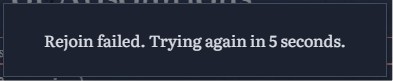
There was still another check to make: would the dialog work when needed? I stopped the server with an interactive page open. In UAT, the first attempt showed what looked like a blank white box. The text was there, but the stock stylesheet supplied a white background while my dark theme supplied light text. I hadn’t caught that after reskinning the site because I hadn’t triggered the dialog.
After correcting the styling, I could read the reconnect message:
Rejoin failed. Trying again in 5 seconds.
The initial-HTML test couldn’t catch this. It checked that the text was absent at first, not that it appeared correctly later. At the time of this change, the package’s JavaScript had no automated tests, so I verified that part manually by interrupting the connection.
Checking Blazor Server SEO titles
I also ran Bing Webmaster Tools’ Site Scan. After the cleanup, the November 23 scan left two title-length warnings on category pages. One title made the problem fairly obvious:
Sins Against the Sacred Sins: Funny Forgiveness Certificates | Sin Forgiver
My template appended “Sins” to the category name, but this category already included that word. The result repeated it and made an already long title longer.
I moved the title construction into a helper. It checks for the word first, then tries progressively shorter suffixes before falling back to the category and site names:
public static string CategoryTitle(string categoryName)
{
    var subject = Regex.IsMatch(categoryName, @"\bsins?\b", RegexOptions.IgnoreCase)
        ? categoryName
        : $"{categoryName} Sins";

    foreach (var tail in new[] { ": Funny Forgiveness Certificates", ": Forgiveness Certificates", string.Empty })
    {
        var title = $"{subject}{tail}{SiteSuffix}";
        if (title.Length <= MaxTitleLength)
        {
            return title;
        }
    }

    return $"{subject}{SiteSuffix}";
}
The word boundary in that regex matters. My first attempt used .Contains("sin"), which also matches “Business.” That’s probably not the theological statement I want my title helper making. I changed it to match a whole word and added “Business” as a test case.
The helper uses the application’s 70-character limit, rather than predicting how a search engine will display a title. It shortens the suffix, but doesn’t truncate the category name itself. An unusually long name would still need separate handling. The snippet also uses the class’s SiteSuffix constant and a Regex import.
Deciding which crawler warnings need a fix
The same scan reported several hundred URLs blocked by robots.txt. That initially looked like a much larger problem than the two title warnings.
When I checked the URLs, they were checkout and “accuse” confirmation pages that I intentionally block from crawling. The scan had discovered them despite their rel="nofollow" links. For those URLs, the blocked status matched my intended crawl policy, so I left it in place.
There is an important distinction here: blocking crawling doesn’t guarantee exclusion from the index. Google explains that a blocked URL can still appear in search results. If your goal is to prevent indexing, check the appropriate indexing controls too. Don’t assume robots.txt and noindex do the same job.
The useful question was whether those pages should be crawlable, rather than how to make every warning disappear.
Redirecting to the preferred hostname
Brave’s results showed the apex domain instead of my preferred www hostname. The apex already redirected to www, but a plain HTTP request took two hops: first to HTTPS, then to www. I adjusted the proxy to send that request directly to the final HTTPS hostname. That shortened the redirect chain; it doesn’t mean search engines will immediately update the URL they display.
Showing the product
Finally, I returned to the certificate preview. Someone considering a purchase should be able to see what they’re buying. The app already generates certificate PDFs with QuestPDF, so I used that generator to create one for a fictional person. I converted it to an image and added it to the home page and sin detail pages, with a red “SAMPLE” mark.
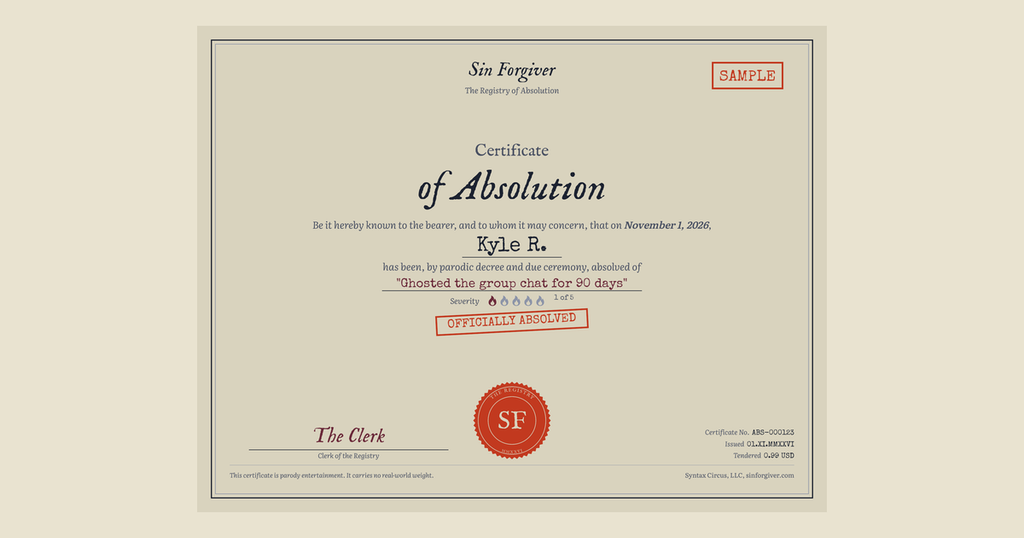
Using the real generator made the sample representative of the product at the time I created it. I’ll still need to regenerate the image if the certificate design changes. This was a product-presentation improvement, and I don’t have evidence that it changed search rankings.
What I don’t know yet
As of the November 23 audit, the sitemap contained 425 URLs. The changes addressed specific implementation and presentation problems, but I don’t yet have search data showing their effect on discovery or traffic.
I want to look at indexing, impressions, and clicks once there’s enough data to make a useful comparison. Until then, I can explain the fixes without claiming that they improved rankings. I’ll write a follow-up when I have results worth discussing, including if little changes.
Conclusion
If you’re reviewing SEO on your own Blazor site, start with the initial HTML and HTTP responses. Then check what your title templates and structured data produce for real content. Those checks helped me find issues that having the usual SEO fields in place hadn’t prevented.
An audience-focused AI critic was useful for deciding where to look. I still needed to verify its findings against the code, the live behavior, and what I actually wanted crawlers to access. That combination gave me a much more useful review than accepting every finding as something to fix.
Credits
- Thomas Burkhart for the post that gave me the idea of priming a critic agent as the target audience.
- Bing Webmaster Tools’ Site Scan, for identifying the category title warnings.
- Feature Photo by MJ Duford on Unsplash.

0 comments on “Blazor Server SEO: What I Fixed After Auditing My Site”